TPE 3D v1.5.1 is rolling out in the App Store as of today. Here are the changes:
Fly Up Behaviour
If you’re “at” a map pin (i.e. you double tapped a pin to fly down to it), there are several ways to resume flying:
- Double tap the screen
- Tap the “Enhanced Mode” button (fourth button top right)
- Tap the “Fly up” button (first button top right)
Until now, all behaved identically, with the camera resuming the previous flying position and camera orientation.
The behaviour of the “Fly up” button has been revised in 1.5.1: instead of resuming the previous flying position, it now lifts the camera directly up to the previous flying elevation level, and maintains the direction of view as it was at the pin.
Thanks to Erik Stensland for the suggestion: the rationale is as follows. You identify a view point (at the pin) and when exploring the view see another potentially interesting location in the landscape. With the default behaviour, as you fly up the camera bearing would potentially change and you could easily lose sight of the new location. The behaviour keeps it in view, making it easier to keep your eye on.
There’s one additional option for this in Settings: “Move back from pin on flying up”. By default this is off, so you end up directly above the pin you were previously at. When enabled, the camera will move back from the pin, but keep the same direction of view. In most scenarios, you then have a view of the pin you were at and an aerial view in the same direction.
Minimum Flying Height
Also new in Settings is a “Minimum flying height” control.
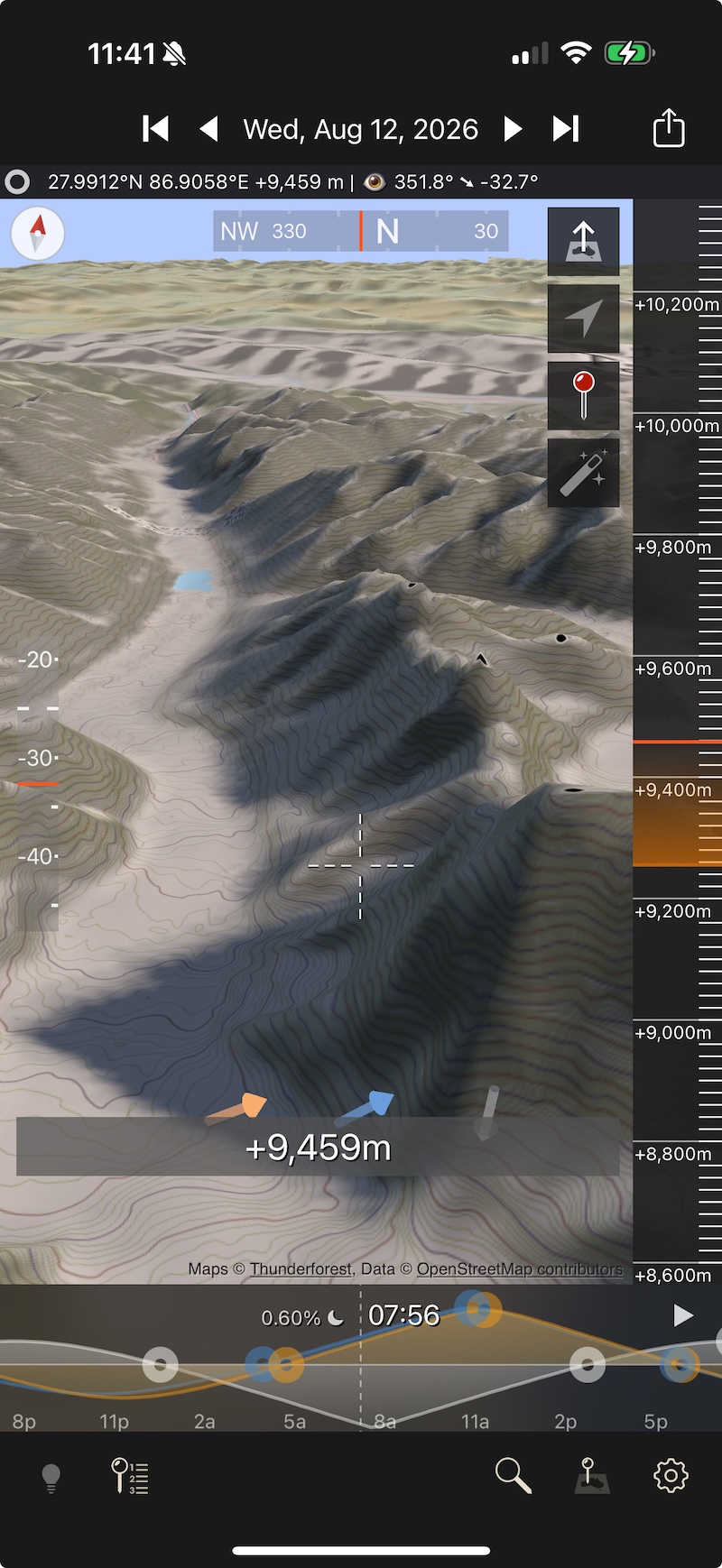
This defaults to a height of 2,000m/~6,500ft, but you can adjust it up or down. You can set this to ensure you don’t inadvertently fly too close to the ground, such that the maps become over-zoomed and appear blurry.
The minimum height above the ground is indicated in the Elevation Gauge by an orange gradient - see here (right of screen):
Interactive Pitch and Bearing Gauges
Finally, the pitch and bearing gauges (screenshot left and top, respectively) are now pannable - drag up or down to adjust the camera pitch and left of right to adjust camera bearing (direction of view). This provides a higher level of control for the camera orientation than was previously available.
Let me know if you have any questions/feedback.
Stephen