TPE Web 4.4 Beta

TPE Web 4.4.0 Beta

The first beta of TPE Web 4.4 is now available on beta.photoephemeris.com.

This is one of the biggest workflow updates we’ve made in a long time. The focus of 4.4 is saved planning: you can now save complete shot plans and visual searches, organize them alongside your saved locations, and return to exactly where you left off.

Quick Walkthrough
:star: New: Shot Plans

You can now save an entire planning session as a Shot Plan.

A saved plan remembers:

  • Camera position
  • Date and time
  • Map location and zoom
  • Sun, Moon and other selected bodies
  • Camera and field-of-view setup
  • The planning page you were using

Open a saved plan later and continue planning exactly where you left off.

Plans automatically sync across your devices.

:magnifying_glass_tilted_left: Save Visual Searches

Visual Searches can now be saved and reused.

Save searches for things like:

  • Milky Way alignments
  • Moonrise compositions
  • Sunrise or sunset lighting
  • Specific celestial targets

Saved searches can either reopen at the original camera location or be applied to your current location.

:counterclockwise_arrows_button: Plans and Searches work together

The two features are tightly integrated.

  • Turn any Shot Plan into a Visual Search to find when the same alignment happens again.
  • Save any Visual Search result directly as a new Shot Plan.
  • Plans remember which search created them, making it easy to revisit or refine your search later.

:books: Welcome to the Library

The old Locations page has become the new Library.

Your Library now stores:

  • Saved Locations
  • Shot Plans
  • Saved Visual Searches
  • Lists

New capabilities include:

  • Favorites
  • Search across your library
  • Upcoming plans
  • Mixed lists containing any combination of locations, plans and searches
  • Bulk selection and bulk delete/move operations

:link: Reference Links

Every saved Location, Shot Plan and Visual Search can now include reference links.

Attach things like:

  • Trail information
  • Park websites
  • Inspiration photos
  • Permit information
  • Any other useful planning resources

:package: Import & Export

Your planning library is now much more portable.

New features include:

  • Export your complete library or selected items as a .tpe archive
  • KMZ export for use with Google Earth, PhotoPills and other compatible applications
  • Import from:
    • PhotoPills KMZ plans
    • PlanIt .pft files
    • GPX
    • GeoJSON
    • KML
    • TPE archives

Duplicate imports are detected automatically.

:round_pushpin: Save Map Pins

You can now save either the red planning pin or the gray geodetics pin directly as a saved Location with a single click.


Improvements

  • Cleaner, more consistent import/export controls throughout the Library.
  • Exported files now use readable filenames instead of technical identifiers.

Sharing Improvements

Shared links are now much smarter.

When you share from a page like:

  • 3D View
  • Eclipse Simulator
  • Moon Simulator

…the recipient now opens that same page, instead of always being taken to the 2D map.

This also means direct deep-link sharing is no longer restricted to paid subscribers.


Fixes

This beta also includes a number of fixes, including:

  • Fixed an issue that could cause the Geodetics sight-line chart to disappear.
  • Tooltips no longer interfere with clicking nearby controls.
  • Various performance and usability improvements throughout the new Library.

As always, feedback from beta testers is hugely appreciated. This release touches a substantial amount of new functionality, particularly around the new Library, Shot Plans, synchronization, import/export, and sharing, so if you spot anything unexpected, please let me know.


Now I’m exhausted and I’m going to bed!

3 Likes

Awesome!!! Can’t wait to try it out! Thanks!

1 Like

PS. I just added a link to a 10-minute video walkthrough of the new functionality in my post above.

1 Like

Thank you for the wonderful work you are doing for all of us!

1 Like

Thank you @cesmar_63 :folded_hands:

Beta update (Build #1210)

A second 4.4 beta build is now available with a handful of new features plus several important fixes.

New

  • Planets can now be used in Shot Alignment and Target Visibility, alongside the Sun, Moon and Galactic Centre.
  • Catalog targets can now be used as time anchors. You can now step dates relative to the rise, transit or set of your selected deep-sky targets, making it easy to plan around objects like M31 or Orion.

Fixes

  • Fixed an important Shot Plan bug affecting users east of Greenwich. Plans saved in Europe, Africa, Asia and Australia could incorrectly lose their date when saved. Existing affected plans are repaired automatically the next time your Library synchronizes.
  • Adding prime lenses from the lens database now works correctly. The lens editor now distinguishes properly between prime and zoom lenses.
  • Micro Four Thirds lenses now automatically select the correct mount when imported from the lens database.
  • Improved recovery if the browser unexpectedly clears local storage (primarily affecting Safari/WebKit), allowing the app to recover cleanly instead of leaving saved resources in an unusable state.

Also included are a number of internal reliability improvements and restored test coverage that don’t affect user-facing functionality.

As always, thanks for testing. Please let me know if you spot anything unexpected.

Beta update (Build #1217)

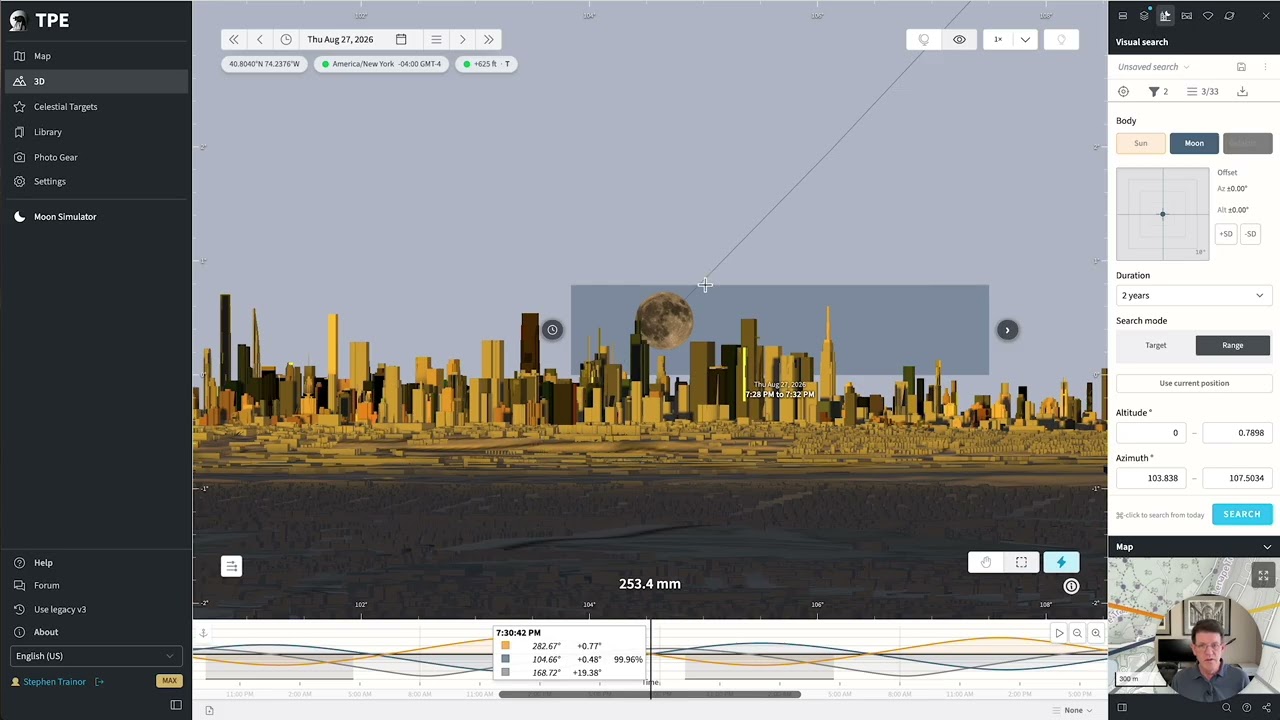
Another 4.4 beta build is now available, focused mainly on improvements to Visual Search in the 3D First Person View.

Improvements

  • Visual Search now reports its results directly in the 3D view. After a search completes you’ll see a brief message showing how many matches were found, and a result counter is now displayed while stepping through search results.

Fixes

  • Drawing a search area below the horizon now explains why no search is run. Instead of silently doing nothing, the app now tells you when the selected area is outside the searchable altitude range (0 degrees or greater)
  • Switching search bodies now clears previous results. Changing from one body (for example, the Sun to Venus) no longer leaves results from the previous search on screen.
  • The search marquee now uses the selected body’s colour while you’re drawing it, making it easier to see which body you’re searching for.

Thanks again to everyone testing the 4.4 beta – your feedback continues to be extremely helpful.

4.4.0 dropped in production yesterday, and a 4.4.1 bug fix has also gone out just now (Thursday), with the following fixes:

  • Meteor showers no longer display black-on-black at night. The radiant point is indicated in white with the text and link displayed over a dark translucent billboard background for daytime legibility
  • Meteor showers are no longer coupled with the selection of the Milky Way in the Bodies and Target panel. They can be turned on or off independently
  • Coordinate parsing in the Search form now supports multiple languages, so for example, you can paste coordinates written using Italian conventions and they will parse correctly when the app is set to English.

Please let me know if you see any issues.

1 Like

Beta update (Build #1233)

The first 4.4.2 beta build is now available. This is a small maintenance update with a handful of bug fixes.

Fixes

  • Address searches now correctly handle special characters. Searches containing apartment numbers or address formats such as 12/2, 12/A or #200 are now passed correctly to the geocoding service, producing much more reliable search results.
  • Saving locations from mini-maps is now more intuitive. When you choose Save as location… from a mini-map or supported search sidebar, the naming dialog now appears immediately on that page instead of unexpectedly later when you next visit the main map.
  • Improved reliability when saving lists and Shot Plans. Save operations now accurately report success or failure, and if something goes wrong your work remains in the dialog so you can try again instead of losing your edits.
  • Additional lens mount mappings have been added when importing from the lens database. Large Format (Copal) and Nikon 1 lenses now automatically select the correct mount.
  • Reduced unnecessary localization warnings generated by older cached versions of the app after upgrading to newer releases.

Thanks for the continuing feedback, questions and suggestions!

1 Like

4.4.2 is now released to production.

1 Like