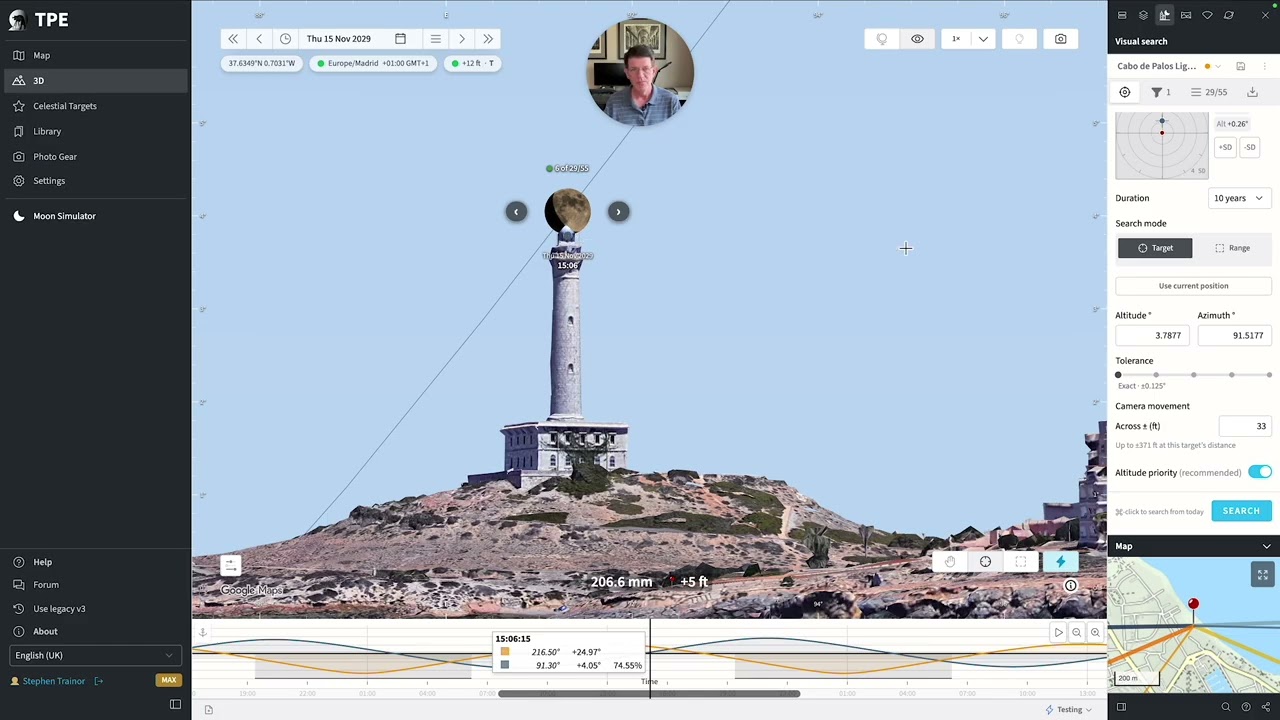
TPE Web 4.6 Beta is now available, with a major expansion of Visual Search aimed at planning precise alignments with real-world subjects, and the option to share or download an elegant visual preview of your planned shot. The example above illustrates using target mode to find alignment dates for the moon above the Cabo de Palos Lighthouse in Spain, and uses Google Photorealistic 3D tiles, recently released for MAX subscribers in 4.5.
Visual Search Targeting: click where you want the alignment
In the 3D First Person View, there are some major improvements to Visual Search Target mode. Target mode is for photographers planning high-precision alignments with tight tolerances, such as the Moon aligned with a building as shown above. Range mode is suitable for broader position searches where there is a wider tolerance of acceptable compositions, such as in landscape photography.
You can now click anywhere in the scene to set the point you want to align with — a summit, building, ridge, or a position in the sky.
TPE uses the clicked point to establish the alignment geometry needed for Visual Search and its 3D visualization. You can then search for times when the Sun, Moon, or another supported body reaches your chosen position relative to that target.
Tell Visual Search how far you’re willing to move
Previously in Target mode, Visual Search would calculate a required lateral move distance to achieve an alignment, as long as it was within your specified tolerance.
You can now specify a camera movement distance: how far you’re prepared or able to move from the current pin to achieve the alignment.
Visual Search can then include results that become viable within that distance, with instructions such as “12 m left” or “8 m forward and 3 m right.” This means that many more shot opportunities are found without the need to test multiple nearby camera pin positions separately – you can do it all in one search.
Even better, when you select one of the results, TPE temporarily moves the primary pin and re-aims the camera, showing the exact alignment that would be achieved if you moved position. The preview uses the actual terrain elevation at the proposed position, so you can immediately assess how the alignment works from where you would really be standing.
The initial movement calculation assumes level ground. If the terrain slopes significantly, moving the suggested distance may not produce the exact predicted alignment because your elevation changes as you move. Set camera movement to zero and Visual Search behaves exactly as before. In the default (and recommended) altitude priority mode, you will be able to set a lateral distance by which you could move left or right.
A new offset control for precise compositions
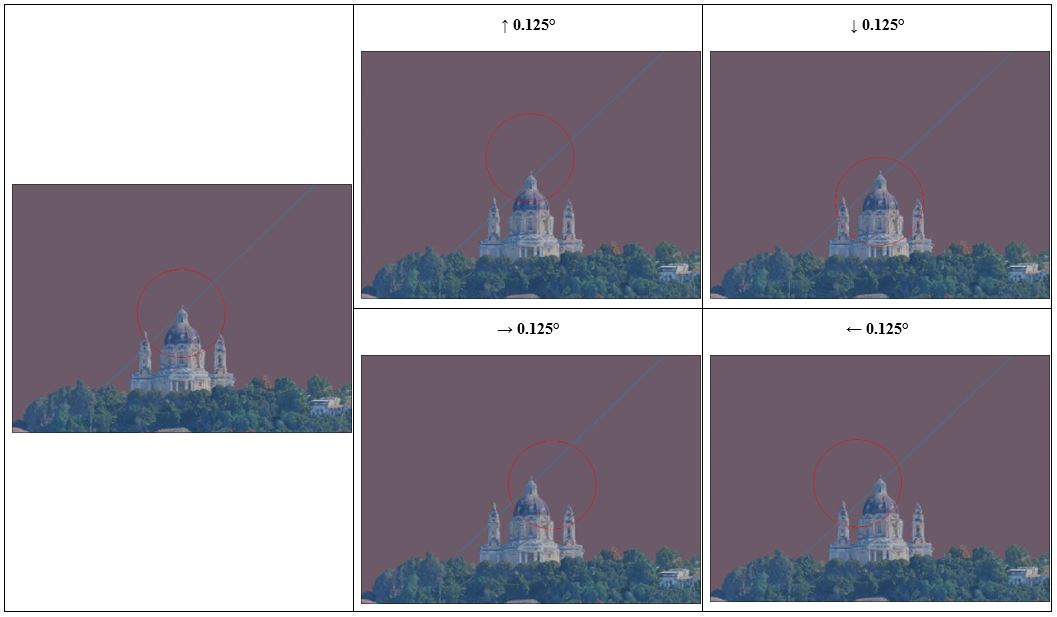
Target mode also gains a new circular offset control, particularly useful for telephoto Sun and Moon compositions.
Concentric rings are based on the apparent size of the solar or lunar disc, making it easy to specify compositions such as placing the Moon two diameters away from your subject at roughly 10 o’clock. Hold the Shift key down to snap to precise clock positions and multiples of the Sun/Moon semidiameter.
The existing square ±10° offset control remains available for wider-field compositions, and you can switch between the two.
Simpler alignment tolerances
Target-mode tolerance now uses five practical settings:
- Exact ±0.125°
- Tight
- Standard ±0.5°, approximately one Sun/Moon diameter overall
- Loose
- Very loose ±2°
This makes it easier to choose a tolerance appropriate to the composition without having to decide on an arbitrary angular value.
Saved Visual Searches remember the composition
Saved Visual Searches now retain more of the view in which you created them, including camera aim, gear/lens framing, or 3D free zoom, and target information.
Reloading a saved search therefore gets you much closer to the composition you were actually working on, rather than restoring only the search criteria.
Saved searches also now offer consistent Reload and Close actions from both the Library and the Visual Search panel.
Save and share your 3D composition as an image
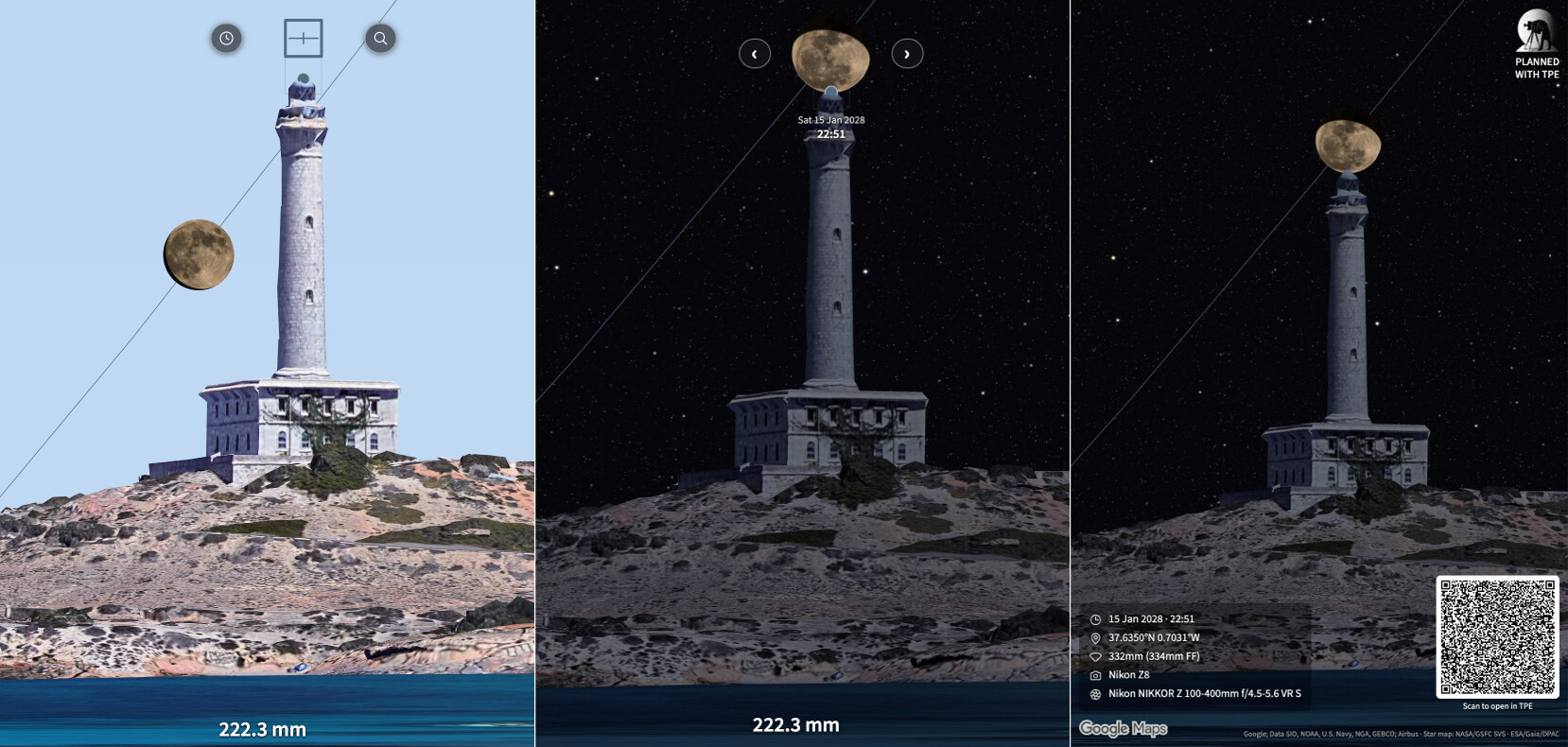
The First Person View can now be exported as a JPEG, including TPE’s rendered sky and the appropriate imagery, using the new Camera button at the top right of the First Person View.
You can optionally add a caption containing:
- Date and time
- Location
- Focal length and selected camera/lens
- Shot Plan name
The exported image also contains the underlying plan information in its metadata, including the planned time, camera position, direction, elevation, gear, and a link back to TPE.
Scan a planned shot to open it in TPE
You can optionally add a QR code to the exported image.
Scan it with a phone and TPE opens the planned view encoded in the image — useful when sharing plans with other photographers or moving a plan between devices.
On supported browsers, a Share button can also send the finished image directly to the system share sheet, making workflows such as AirDrop possible without saving the image first.
Please share your planned images on your website or social media, either before or after your shoot. Tag us with #plannedwithtpe.
For posting to Instagram, for example, on Mac, you can AirDrop the image to your phone and post directly from there. We’d love to see more of your plans out there to inspire others and help them learn what TPE can do.
Other improvements
- The Visual Search panel has been reorganized and made more compact.
- Search indicators in the First Person View now better distinguish between Target and Range searches.
- Editable numeric values are more clearly presented as interactive controls.
- Tabs throughout the app have a new, clearer visual treatment.
- Sun, Moon, stars, Milky Way, meteor markers, Visual Search overlays, and other sky elements now render in a consistent order, eliminating several remaining visual artifacts in First Person View.
- Sun and Moon paths now remain continuous where they cross a Visual Search area.
- Editing Visual Search offset, duration, or altitude priority now immediately updates the search criteria correctly.
- Several fixes improve restoring, saving, and reloading Visual Searches and their target/camera positions.
- Share links for locations east of Greenwich now preserve their date and time correctly when re-shared.
The major thing to try in 4.6 is the new click target → set composition → declare how far you’ll move → search workflow. It turns Visual Search from a search for alignments at one exact camera position into a tool for answering a more practical question: where and when do I need to stand to get this shot?
 ! I guess there’ll always be those who prefer to be given the answers by others. Maybe planning tools aren’t for them!