In our quest to keep TPE Web the best possible desktop shot planning tool, here’s a bumper beta drop for the upcoming 4.9.0 release. The big change? Skies in 3D now look a lot prettier and more realistic. Some examples:
Sunrise over Venice
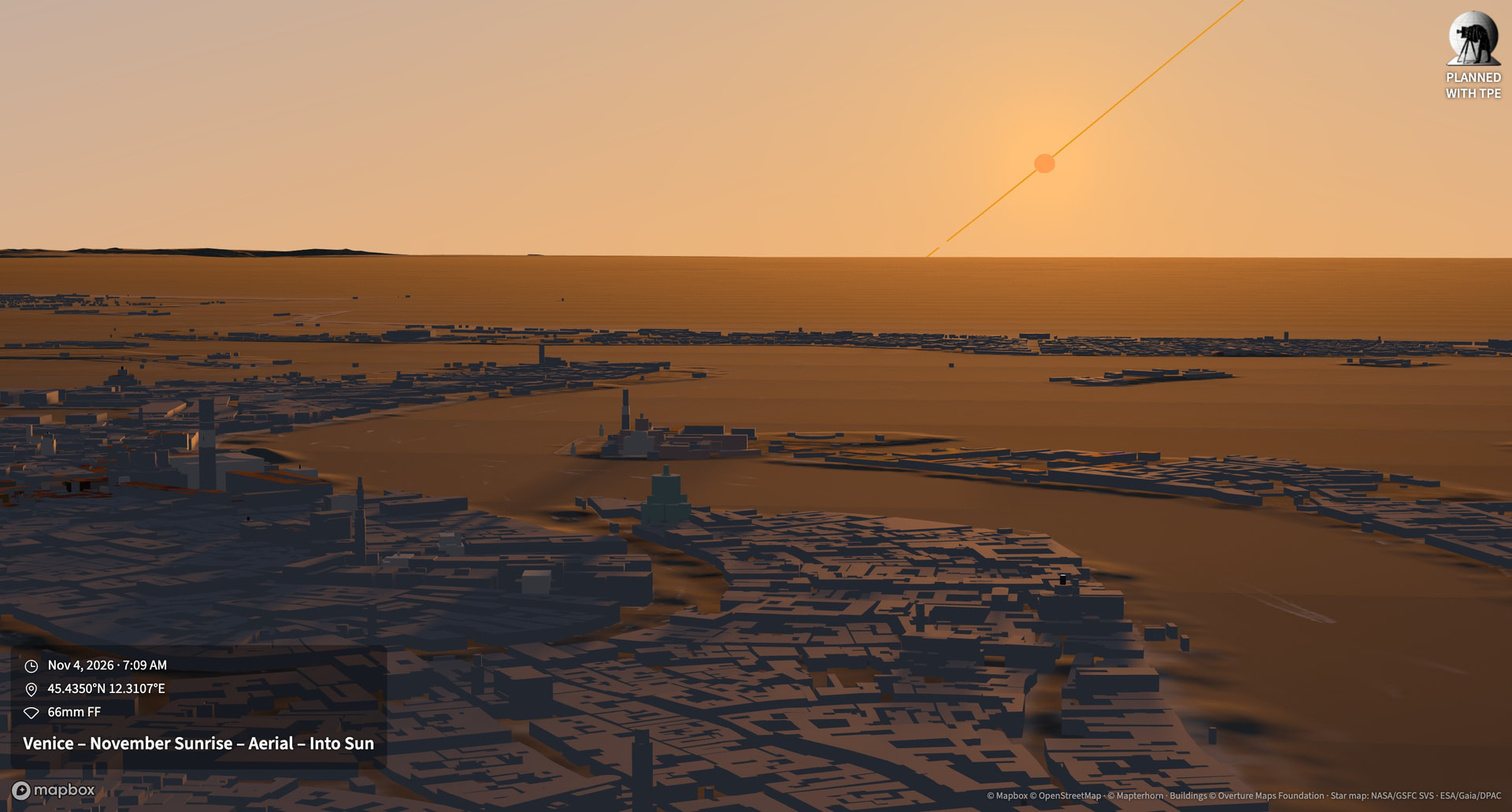
More realistic flared light for the sun
Moonrise through the Belt of Venus
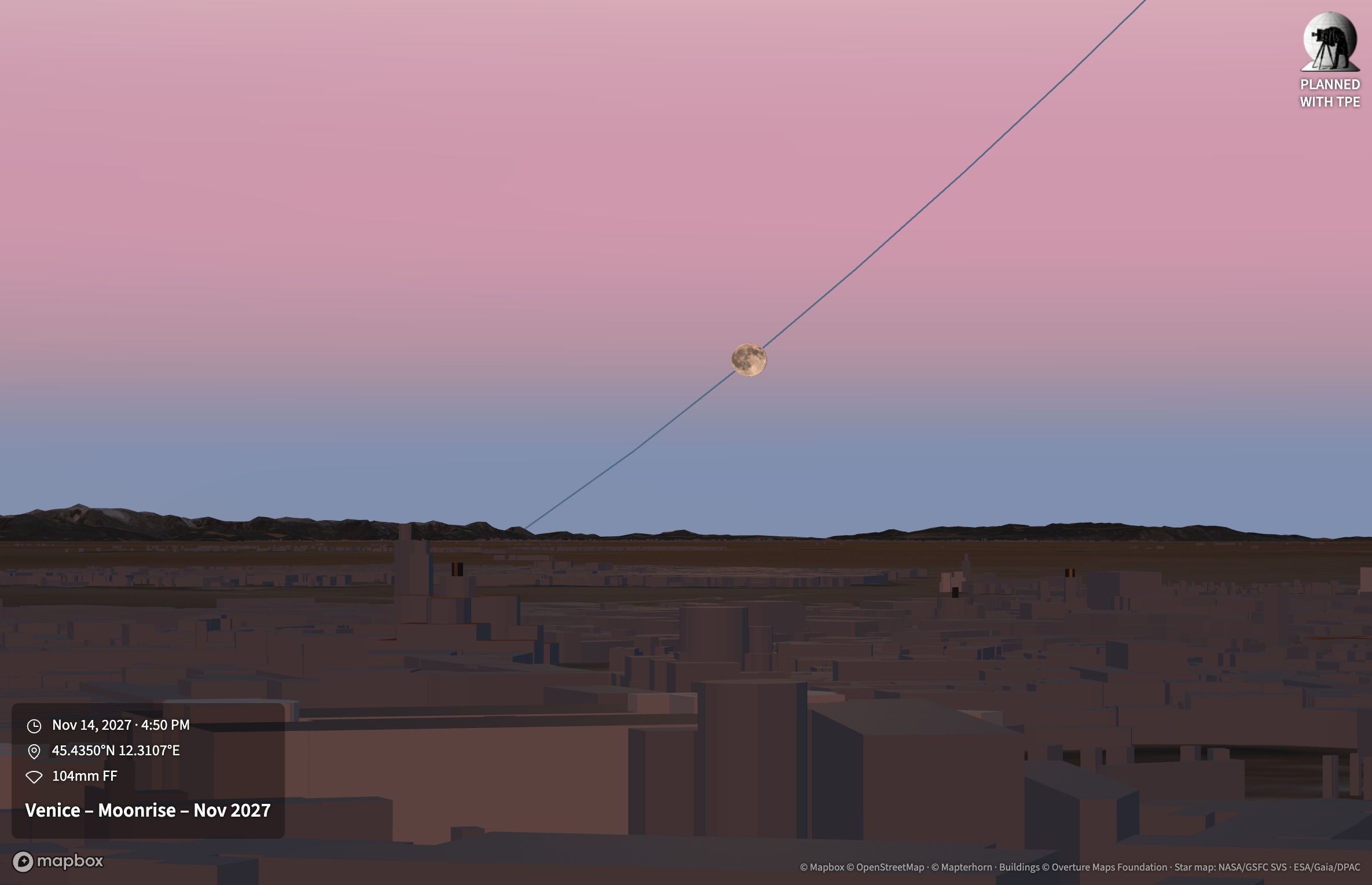
The Belt of Venus appears with accurate timing, position and sizing
Moonglow over Aconcagua
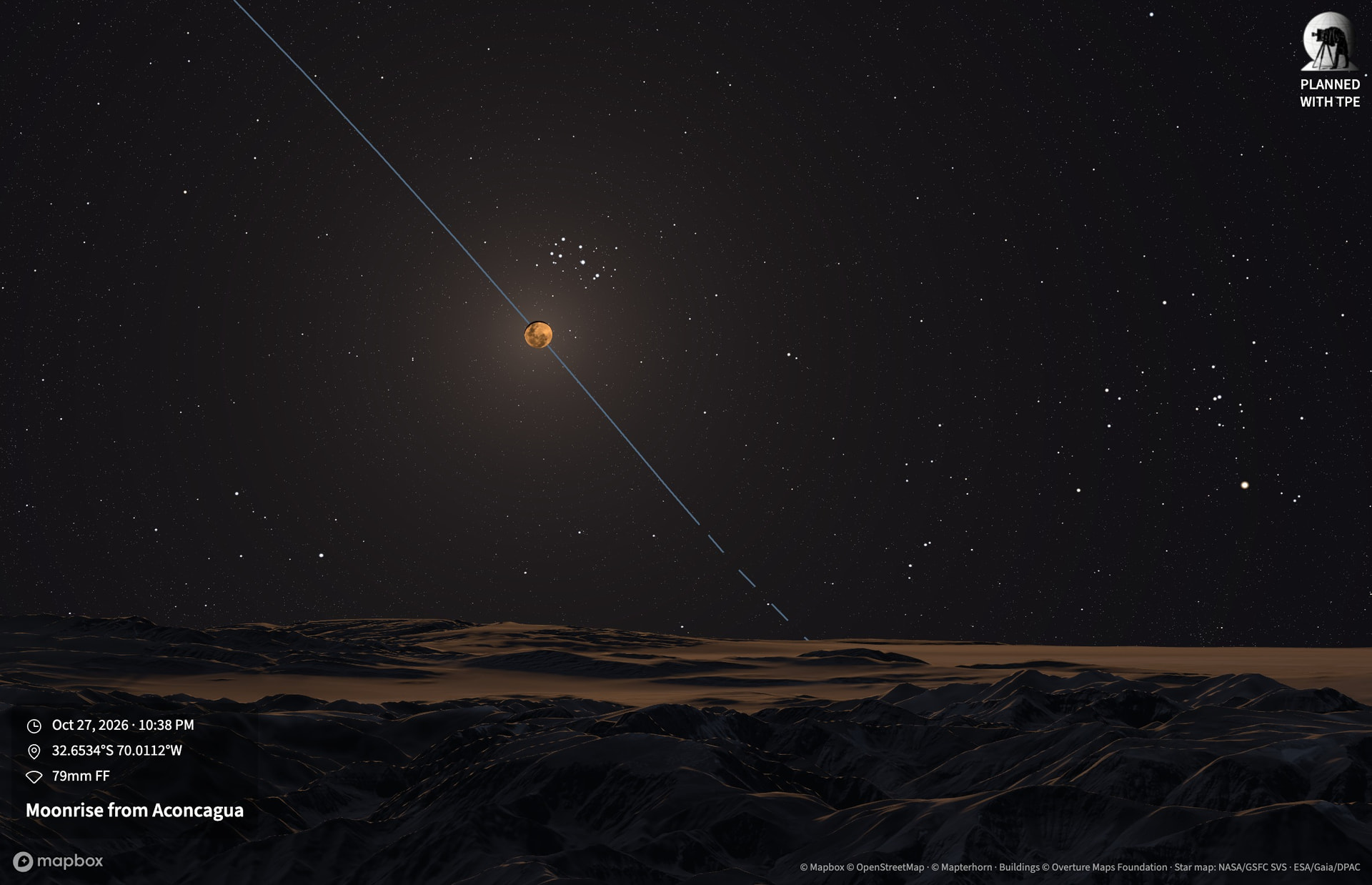
The effect of a brighter moon on the night sky is shown (you can disable this in the lighting settings menu)
Pre-dawn Twilight Glow from Longs Peak
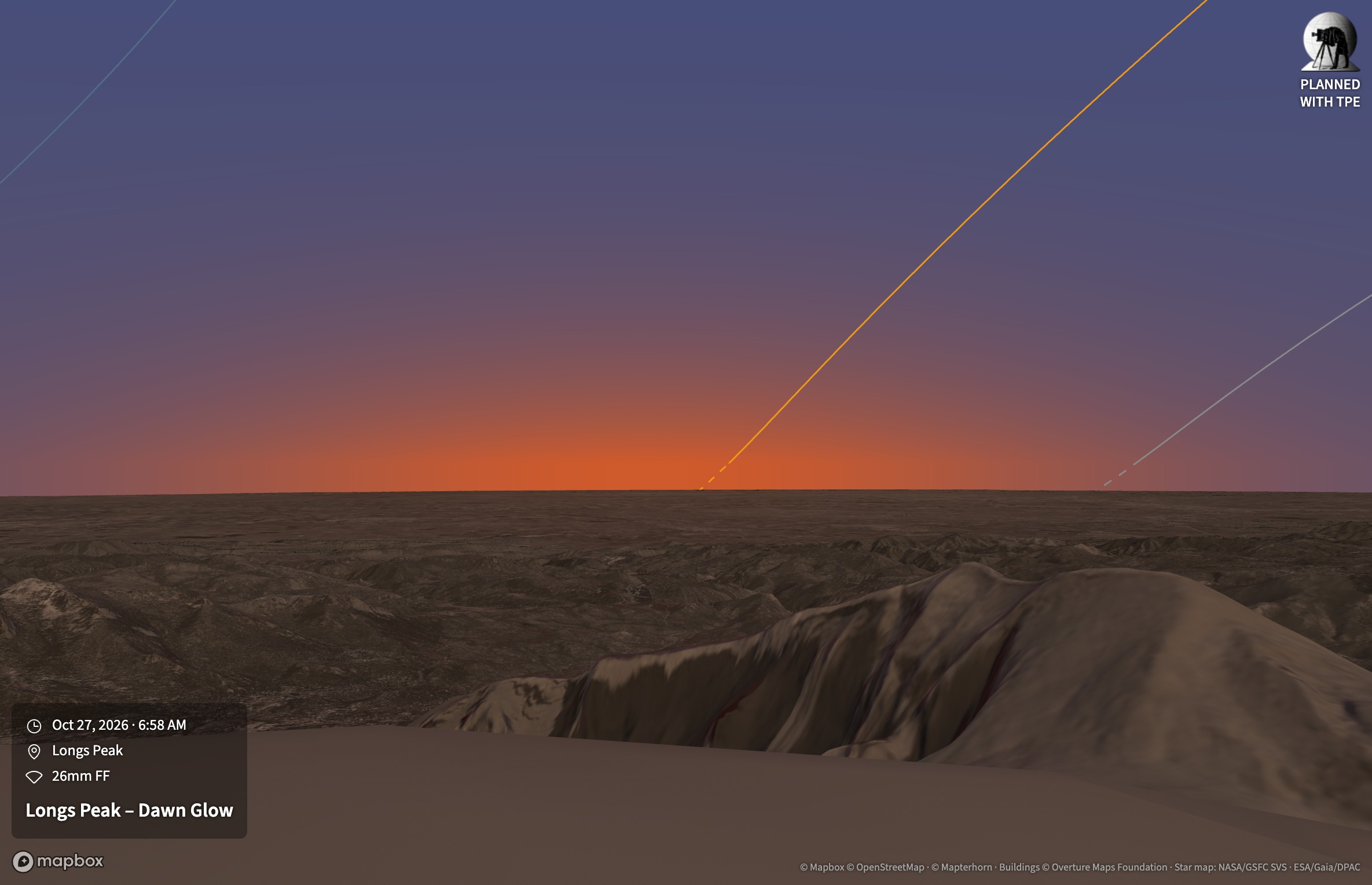
The late Nautical twilight/early Civil twilight pre-dawn glow is now rendered automatically.
TPE 4.9.0 beta: October 20, 2026 update
A new beta of The Photographer’s Ephemeris is live at beta.photoephemeris.com. This update brings a new 3D sky, a reference layer for the Celestial Targets Sky tab, Shot Plans and Presets on Celestial Targets, and every map overlay in split view and on the docked map.
New
A new 3D sky
The sky on /3d now follows the sun through the day and twilight, and dawn is no longer a copy of dusk.
- Twilight glow toward the sun: pale gold with the sun up, deep orange from about −4° to −7°, red past −8°, gone by −12°. It hugs the horizon more tightly as the sun sinks.
- Opposite the sun, Earth’s shadow rises as a steel-blue band, clearest with the sun 2° to 4° below the horizon, with the rose Belt of Venus along its upper edge. The same happens before sunrise.
- By day, a bright halo surrounds the sun, warm when it is low, and the sky is a deeper blue about 90° away from it. At sunset the zenith stays a clear blue and darkens through nautical twilight, instead of going nearly black by −6°.
- Moonlit sky: with the Moon up after dark, the sky turns a soft grey-blue that brightens toward the horizon, with a glow around the Moon. It is strongest under a high full Moon; a crescent barely shows.
- Stars appear overhead first and in the twilight glow last. A bright sky hides the faint stars and the Milky Way first: under a high full Moon only the Milky Way’s brightest clouds remain, faintly.
Moonlit sky switch
The /3d Lighting menu has a new Moonlit sky switch, on by default. Turn it off to keep the night sky dark and starry, for example to plan where the Milky Way sits on a moonlit night. Presets remember it when it is off. The Lighting button shows a small dot for red night mode and one for the moonlit sky while each is on.
Reference layer on the Celestial Targets Sky tab
A new Show menu on the Sky tab adds reference lines that aren’t on your list:
- Galactic Center (on by default): its path across your sky, as a red dashed line so it doesn’t look like a target. Hover it for its direction and, in Date range mode, the time it is highest.
- Celestial pole (on by default): a red cross at the pole. In the Northern Hemisphere it is labeled Polaris, with Polaris’s small circle around it.
- Equatorial grid (off by default): faint declination circles every 15°, with the celestial equator a little brighter, and lines marked in hours from the meridian. A target is on the +2h line two hours after it is highest.
With Positions on, the Galactic Center and Polaris each get a red dot for the chosen time. The legend lists whatever is shown, and your choices are kept on this device.
More on Celestial Targets
- Shot Plans and Presets now work on the Sky and Calendar tabs, for a list and for a single target. Plans keep your visibility settings (darkness, Moon, minimum altitude and horizon profile) and the Position Window (MAX). Presets keep the tab, the side panel, the layout and the Sky tab’s time mode. Option/Alt+1–9 and the command palette’s plan and preset commands work here too.
- Field of view: both Sky tabs now offer the FOV panel, to frame and aim the view as on /3d.
- Positions to the minute: the Positions slider in Date range mode now moves one minute at a time. Page Up and Page Down, or Shift with an arrow key, jump a quarter hour.
- Labels stay readable: target labels no longer sit on top of the legend, the coordinate badges or the selected target’s card.
Every overlay in split view and on the docked map
- Split view: the primary pin’s map now shows every overlay: field of view, viewshed, terrain and sun layers, Shot Alignment, Target Visibility and weather. Swapping the pins swaps the two maps’ views, and a map whose pin jumps out of view (a saved location, a search, a Shot Plan) frames it again.
- Docked map and mini-map: on /3d, the simulators and Celestial Targets, the mini-map now draws every overlay the home map does, with the weather legend when docked, on both the standard map and Google Maps.
Changed
- Moon simulator sky and Moon: the simulator now uses the new 3D sky, so twilight no longer turns the zenith nearly black, and at night the sky brightens around a bright Moon. The Moon blends into the sky: its unlit side and an eclipse’s shadow show the sky behind them instead of a dark band.
- The Moon in 3D is near-white high in the sky and reddens toward the horizon, as the sun does; it used to be brown. By day it is pale as commonly observed.
- Light pollution no longer combines with the color-coded overlays (elevation, aspect, slope, irradiance, Shot Alignment, Target Visibility, weather), whose colors it made unreadable. Turning one on turns the other off. It still combines with hillshade, the line layers and viewshed.
- Side panel tabs are in the same order on every page.
- Signing in on a slow connection: if restoring your session times out, TPE now waits longer on each retry, tells you when the next try happens and offers Try now. Meanwhile pages that need an account show “Signing you in…” instead of asking you to sign in, and the Moon simulator does too, instead of asking you to upgrade.
Fixed
- Moon simulator on first load: the Moon could appear faint and lit from the wrong side, with its surface labels piled up in the middle, until you changed the time.
- Map layers turning themselves back on: opening TPE in a browser could restore that browser’s old map layers to your account, so a layer you had turned off elsewhere (3D buildings, for example) came back on. Your account’s settings now decide.
- Celestial targets from a link: opening a link with a target that was also a selected favorite could, after a reload, drop one target and show another twice.
Things to try
- Watch a sunset or sunrise on /3d by scrubbing the time from about 10° above the horizon down to −12°, facing the sun and then facing away from it.
- Pick a night near full Moon, then switch Moonlit sky on and off.
- On a Celestial Targets Sky tab, turn on the equatorial grid, then try Date range mode with Positions on and drag the time slider.
- With geodetics on, open split view with an overlay such as viewshed or Shot Alignment turned on.